
Cards
A card starts an action: play an album, continue an audiobook, tune a station, make it louder, shut the box down. Cards are registered in the web page and need no editing of files.
Registering a card
Section titled “Registering a card”- Easiest: play something, tap the card button in the player, hold the card on the reader.
- A card the box does not know: when you hold it on the reader, the player shows Register.
- From the list: Settings → Cards → card list → +, hold the card on the reader, choose what it does.
While you register, a card that is already in use does not start playing.
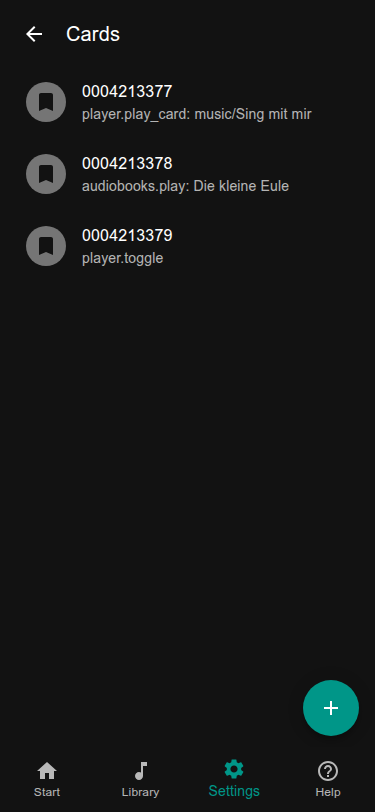
What a card can do
Section titled “What a card can do”| Action | What happens |
|---|---|
| Play music | an album, a folder or one song |
| Play audiobook | continue where the child stopped, or start over |
| Play radio | a station |
| Play podcast | the newest episode not heard yet, or a chosen one |
| Audio and volume | louder, quieter, pause, next, previous, shuffle, repeat |
| Timers and system | sleep timer, read out the IP address, shut down |
| Time limits | extra time for today, see Time limits |
A card for grown-ups, for example “shut down”, is best kept where the children do not find it.
The same card again
Section titled “The same card again”When a folder card is put on again while its folder plays, the box can do something else than starting from the beginning: pause and continue, play the next song, or restart. This is set under Settings → Cards (Same card placed again). Audiobook cards always continue.
Cards that stay on the box
Section titled “Cards that stay on the box”Some readers notice when the card is on the box and when it is taken off. With such a reader the box can behave like a figure on a speaker: music plays while the card is on and pauses when it is taken off. Switch on place instead of swipe for the reader and choose the action for taking the card off, for example pause. The action is the same for all cards of that reader. Putting an audiobook card back continues the book. Which readers can do this is in RFID readers.
A single card can be excluded from the removal action with ignore_card_removal_action: true in its entry in
cards.yaml (useful for cards such as “start a timer”), and ignore_same_id_delay: true lets it repeat while it lies
on the reader (a “next song” card).
Where cards are kept
Section titled “Where cards are kept”Cards are in settings/cards.yaml, one entry per card. The web page writes it; you can also edit it. The card number
must be written in quotes:
'0001': action: player.pause'0002': action: player.play_card args: folder: path/to/folderAll actions, with their arguments, are listed by the running box at http://<name>/api/v1/actions.
Frequent ones: player.play_card, player.play_album, audiobooks.play, radio.play, podcasts.play,
player.toggle, player.next, player.prev, player.shuffle, player.repeat, volume.change_volume,
system.say_my_ip, hardware.shutdown.
Not all cards work
Section titled “Not all cards work”Readers read cards of one frequency (125 kHz or 13.56 MHz), and some readers only know some card types. See RFID readers.